If you have an Android app and you wish to build and deploy with confidence you might think end to end test automation is the way to go. But if one goes a little deeper and understand unit testing with its application their opinion might change. As with proper use of unit test cases one can test most of their code by just writing them properly. Therefore in today’s age most of the product and tech organizations emphasize on writing Android JUnit test cases for their Android apps. But writing unit test cases are only one part of the process, as a an engineer we also need to identify the areas to write unit test cases so that we can cover most of the code. To identify the areas of code that are covered and not covered by unit test cases we use Java code coverage (JaCoCo) plugin for Android. This tutorial is aimed to share a clean approach for integrating Android Jacoco plugin and explain its use cases in CI/CD world.
Android JaCoCo Implementation
When writing JUnit test cases for an Android app, our goal is to cover as much of the codebase as possible so that we can release with confidence. However, to identify the parts of the code that are not covered by JUnit tests, we need a tool that can generate a detailed coverage report and provide a clear view of which areas still require JUnit tests.
To generate an Android JUnit test coverage report, we can use the JaCoCo plugin. JaCoCo is not limited to Android projects; it can be used with any Java project to generate JUnit coverage reports. But, keeping the scope limited to the Android implementation of JaCoCo, let us take a look at a cleaner and more streamlined way to implement the JaCoCo plugin in an Android app project.
In your app level folder parallel to build.gradle.kts(app) file create a new file jacoco.gradle.kts and add following code in it:
import org.gradle.api.tasks.testing.Test
import org.gradle.testing.jacoco.plugins.JacocoPluginExtension
import org.gradle.testing.jacoco.plugins.JacocoTaskExtension
import org.gradle.testing.jacoco.tasks.JacocoReport

apply(plugin = "jacoco")

configure<JacocoPluginExtension> {
    toolVersion = "0.8.12"
}

tasks.withType<Test> {
    configure<JacocoTaskExtension> {
        isIncludeNoLocationClasses = true
        excludes = listOf("jdk.internal.*")
    }
}

tasks.register<JacocoReport>("jacocoTestReport") {
    dependsOn("testDebugUnitTest")

    reports {
        xml.required.set(true)
        html.required.set(true)
    }

    val exclusions = listOf(
        "**/R.class",
        "**/R\$*.class",
        "**/BuildConfig.*",
        "**/Manifest*.*",
        "**/*Test*.*",
        "android/**/*.*",
        "**/Lambda\$*.class",
        "**/Lambda.class",
        "**/*Lambda.class",
        "**/*Lambda*.class",
        "**/*_MembersInjector.class",
        "**/Dagger*.*",
        "**/*Dagger*.*",
        "**/*_Factory.class",
        "**/*_Provide*Factory.class",
        "**/*_ViewBinding*.*",
        "**/BR.class",
        "**/DataBinderMapperImpl.class",
        "**/DataBinderMapperImpl\$*.class",
        "**/DataBindingInfo.class",
        "**/*\$Creator.class",
        "**/*\$DefaultImpls.class",
        "**/*\$Companion.class"
    )

    sourceDirectories.setFrom(files("${project.projectDir}/src/main/java"))

    // Using specific paths for Java and Kotlin classes to avoid "different class with same name" error
    val javaClasses = fileTree("${layout.buildDirectory.get().asFile}/intermediates/javac/debug/classes") {
        exclude(exclusions)
    }
    val kotlinClasses = fileTree("${layout.buildDirectory.get().asFile}/tmp/kotlin-classes/debug") {
        exclude(exclusions)
    }

    classDirectories.setFrom(files(javaClasses, kotlinClasses))

    executionData.setFrom(fileTree(layout.buildDirectory.get().asFile) {
        include(listOf("jacoco/testDebugUnitTest.exec", "outputs/unit_test_code_coverage/debugUnitTest/testDebugUnitTest.exec"))
    })
}
Now that we have a separate file for Android Java Code Coverage (JaCoCo) plugin implementation, its makes our original build.gradle.kts file cleaner. To make this work we just need to add the following in the build.gradle.kts (app) file at the end:
apply(from = "jacoco.gradle.kts")
In this Android JaCoCo implementation, we just defined that we want XML as well as and HTML coverage report for the available unit test cases. Now to actually get the Android JUnit coverage report we just need to run the below mentioned gradle task:
./gradlew clean :app:jacocoTestReport
Issues faced with Android JaCoCo implementation
In a modern Android project to make Android JaCoCo implementation work properly and generate reports we need to define both compiled Java and Kotlin class directories for full coverage. Otherwise we may miss out on classes to be covered, but in a one off scenario – even when it was defined correctly, I encountered this issue:
> Task :app:jacocoTestReport
[ant:jacocoReport] Classes in bundle 'app' do not match with execution data. For report generation the same class files must be used as at runtime.
This issue states that ‘same class files must be used at runtime’ – I was wondering, does that mean that the classes were being instrumented at runtime? This made me think about the working of Firebase Performance Monitoring plugin (which was also included in my build.gradle)- it instruments the classes at runtime. Then I tried disabling Firebase Performance Monitoring SDK for debug builds using the code below and JaCoCo started working just fine. If you are also facing a similar issue, try using the same work around:
        debug {
            ...
            // Added this line for jacoco plugin
            configure<FirebasePerfExtension> {
                setInstrumentationEnabled(false)
            }
        }
When I further investigated, I found out that similar issues were reported on the firebase’s GitHub repo, hope they’ll solve this in future.
Android JaCoCo Coverage Report
As a practice when developing large scale Android apps, we tend include a lot of SDKs to solve various things for us, JaCoCo is also one of them. In Android Studio we can get coverage reports by simply using Android Studio’s run with coverage option as well. But when comparing Android Studio’s coverage option with JaCoCo coverage report you’ll see a significant difference in the details that JaCoCo coverage report shares. Also its not just about the details Android Studio’s “Run with Coverage” option does not has, the main difference is that -its more of an IDE tool, vs JaCoCo report shared a detailed code analysis with coverage numbers which can be used in various CI pipelines.

The JaCoCo plugin provides an option to generate HTML reports, as shown in the image above. The Java code coverage report allows us to click through and navigate inside the classes to see exactly which lines are covered. It also highlights missed lines, methods, and classes, helping us identify areas that still need to be covered by our JUnit tests. Once you integrate and run JaCoCo plugin for Android, typically you will find the report at this path: build/reports/jacoco/jacocoTestReport/html/index.html.
JaCoCo plugin usages in CI/CD
As Android applications scale and more engineers contribute to the codebase, application stability becomes critical. If every code merge or push to a Git branch introduces compilation or logical errors, it can result in significant productivity loss. To ensure releases remain resilient and predictable, large-scale organizations typically enforce a unit test coverage target of 80% or higher.
Achieving this level of unit test coverage requires two key mechanisms: first, the ability to measure the current unit test coverage, and second, the ability to pass or fail Git pull request checks based on that coverage. For Android applications, the JaCoCo plugin helps implement both of these mechanisms effectively.
In previous sections of this Android code coverage tutorial, I have shown how JaCoCo plugin can help in measuring the code coverage. In the next sections lets have a look at how JaCoCo plugin’s coverage report can be consumed in leading tools used for tracking Android code coverage which will eventually help in building CI and PR checks.
Print in your CI Pipeline
There are many use cases where we just need Android JUnit code coverage number when our Gradle task for running the unit test cases completes. We can print the coverage by just parsing XML report generated by the JaCoCo plugin. To implement the same please add the below code at the end of your jacocoTestReport task, which was created in previous section:
doLast {
    val reportFile = file("${layout.buildDirectory.get().asFile}/reports/jacoco/jacocoTestReport/jacocoTestReport.xml")
    if (reportFile.exists()) {
        val factory = javax.xml.parsers.DocumentBuilderFactory.newInstance()
        factory.setFeature("http://apache.org/xml/features/nonvalidating/load-external-dtd", false)
        val parser = factory.newDocumentBuilder()
        val doc = parser.parse(reportFile)
        val root = doc.documentElement
        val nodeList = root.childNodes

        println("-------------------------------------------------------")
        println("Code Coverage Summary (Project Level):")

        for (i in 0 until nodeList.length) {
            val node = nodeList.item(i)
            if (node is org.w3c.dom.Element && node.tagName == "counter") {
                val type = node.getAttribute("type")
                val missed = node.getAttribute("missed").toDouble()
                val covered = node.getAttribute("covered").toDouble()
                val total = missed + covered
                val percentage = if (total > 0) (covered / total) * 100 else 0.0

                if (type == "INSTRUCTION") {
                    println("Instructions : ${String.format("%.2f", percentage)}% (${covered.toInt()}/${total.toInt()})")
                } else if (type == "BRANCH") {
                    println("Branches     : ${String.format("%.2f", percentage)}% (${covered.toInt()}/${total.toInt()})")
                } else if (type == "LINE") {
                    println("Lines        : ${String.format("%.2f", percentage)}% (${covered.toInt()}/${total.toInt()})")
                }
            }
        }
        println("-------------------------------------------------------")
    } else {
        println("Jacoco report XML not found at ${reportFile.absolutePath}")
    }
}
I will add the link to complete source code at the end of this tutorial for better understanding. This script will print below text as output when the execution of jacocoTestReport task completes.
> Task :app:jacocoTestReport
-------------------------------------------------------
Code Coverage Summary (Project Level):
Instructions : 3.39% (976/28763)
Branches     : 0.56% (9/1614)
Lines        : 2.61% (140/5367)
-------------------------------------------------------
For example if Jenkins CI is being used, simply use shell commands with piping, a Groovy script in a pipeline, or the Log Parser Plugin to parse the above coverage output.
Integrate with BrowserStack
If you want to integrate a third-party tool such as BrowserStack with your CI pipeline, you can do so using BrowserStack App Automate feature, which allows you to offload your UI Espresso test executions to BrowserStack. However, in this tutorial we are focusing specifically on JUnit test coverage. Therefore, we will limit the discussion to that topic and explore BrowserStack’s support for JUnit coverage.
To track JUnit test executions using BrowserStack’s Test Reporting & Analytics feature, you need to add the following task to your jacoco.gradle.kts file:
// Task to upload coverage and test reports to BrowserStack.
tasks.register("uploadReportsToBrowserStack") {
    dependsOn("jacocoTestReport")
    doLast {
        val bsUser = if (project.hasProperty("bsUser")) project.property("bsUser") else "YOUR_USER_ID"
        val bsKey = if (project.hasProperty("bsKey")) project.property("bsKey") else "YOUR_USER_KEY"
        val buildId = java.text.SimpleDateFormat("yyyy-MM-dd_HH-mm").format(java.util.Date())

        // Upload JUnit XML Reports (to Automation Upload endpoint)
        val junitReportDir = file("${layout.buildDirectory.get().asFile}/test-results/testDebugUnitTest")
        if (junitReportDir.exists()) {
            println("Uploading JUnit reports to BrowserStack...")
            junitReportDir.listFiles { f -> f.extension == "xml" }?.forEach { xmlFile ->
                exec {
                    commandLine(
                        "curl", "-u", "$bsUser:$bsKey", "-vvv",
                        "-X", "POST",
                        "-F", "data=@${xmlFile.absolutePath}",
                        "-F", "projectName=TambolaCaller",
                        "-F", "buildName=Unit Test Coverage",
                        "-F", "buildIdentifier=$buildId",
                        "-F", "tags=unit_test, android",
                        "-F", "frameworkVersion=junit, 4.13.2",
                        "https://upload-automation.browserstack.com/upload"
                    )
                }
            }
        }
    }
}
If you wish to specify a build Id you can put that custom logic in line 7 above. Once this task executes, it would upload your JUnit test report to BrowserStack’s APIs. As of now, I did not find a way to upload JaCoCo reports to browserStack, hopefully in future they may introduce this feature.
Integration with GitHub Actions and workflows
To enforce a minimum JUnit test coverage threshold, the jacocoTestReport Gradle task is executed on the CI platform, and its result is reported back to the Git repository as a pull request (PR) check using webhooks. If GitHub is used as the source code repository, it can also serve directly as the CI/CD platform. In modern technology stacks, GitHub Actions is commonly used as the CI/CD tool, as it has the capability to trigger builds and perform automated PR checks. For this Android JaCoCo tutorial I had created a github action which acts as a gating check based on Android JaCoCo coverage report. To implement the same please create a file .github/workflows/android.yml with following code:
name: Android CI

on:
  push:
    #branches: [ "master" ]
  pull_request:
    #branches: [ "master" ]

jobs:
  build:

    runs-on: ubuntu-latest

    steps:
      - uses: actions/checkout@v4
      - name: set up JDK 17
        uses: actions/setup-java@v4
        with:
          java-version: '17'
          distribution: 'temurin'
          cache: gradle

      - name: Grant execute permission for gradlew
        run: chmod +x gradlew
      - name: Generate JaCoCo report
        run: ./gradlew clean jacocoTestReport

      - name: Upload Report
        uses: actions/upload-artifact@v4
        with:
          name: report.xml
          path: ${{ github.workspace }}/**/build/reports/jacoco/**/jacocoTestReport.xml

      - name: JaCoCo Report
        id: jacoco
        uses: Madrapps/[email protected]
        with:
          paths: |
            ${{ github.workspace }}/**/build/reports/jacoco/**/jacocoTestReport.xml,
            ${{ github.workspace }}/**/build/reports/jacoco/**/debugCoverage.xml
          token: ${{ secrets.GITHUB_TOKEN }}
          min-coverage-overall: 80
          min-coverage-changed-files: 80
          title: Code Coverage

      - name: Get the Coverage info
        run: |
          echo "Total coverage ${{ steps.jacoco.outputs.coverage-overall }}"
          echo "Changed Files coverage ${{ steps.jacoco.outputs.coverage-changed-files }}"

      - name: Fail PR if overall coverage is less than 80%
        if: ${{ steps.jacoco.outputs.coverage-overall < 80.0 }}
        uses: actions/github-script@v6
        with:
          script: |
            core.setFailed('Overall coverage is less than 80%!')
Once the above file is pushed in code repository, whenever a code push or pull request is created GitHub Actions will trigger a CI build. This CI build will run the jacocoTestReport gradle task, whose report would be used to post a comment on the pull request(PR) and a check would be added for PR merge.
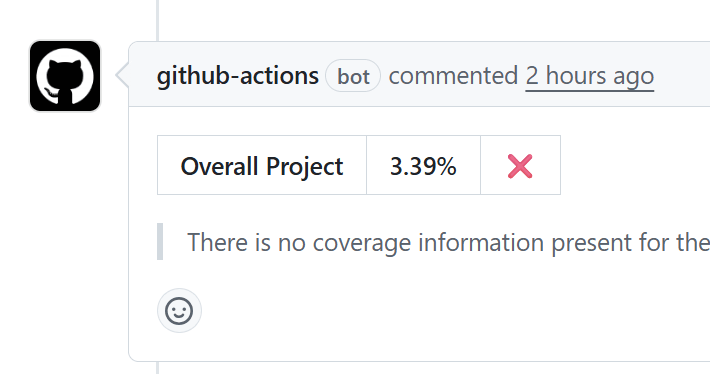
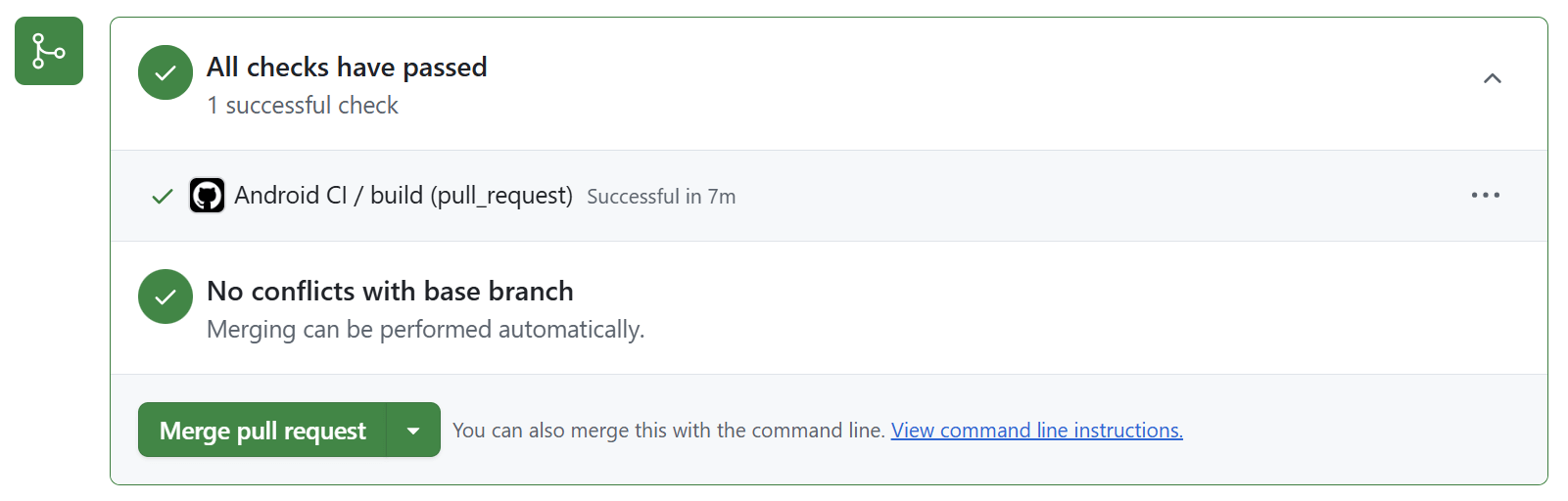
GitHub actions is a very powerful workflow which can help automate not just this use case but many other as well. For example it can be used to perform code quality checks, integrations with third party apps and much more. For better understanding please find the link to full source code used in this tutorial here:
The above mentioned code link gives you full access to the jacoco.gradle.kts and android.yml files used in this JaCoCo integration tutorial for Android. As the codebase of an app evolves and team grows it becomes necessary to work on JUnit code coverage so that we can release with confidence. In this article we learned how to integrate JaCoCo plugin in an Android app in a clean way. Also I showcased how JaCoCo is used to enforce gating mechanisms via GitHub PR checks. There are many other use cases JUnit test cases and JaCoCo can solve. Please let me know what innovative use cases you are solving via JaCoCo in Android in the comments section, hope this article helped.

Born in New Delhi, India. A software engineer by profession, an android enthusiast and mobile development evangelist. My motive here is to create a group of skilled engineers, who can build better software. Reason being programming is my passion, and also it feels good to make a device do something you want. Professionally I have worked with many software engineering and product development firms. As of now too, I am employed as a senior engineer in a leading tech company. In total I may have worked on more than 20 projects professionally, but whenever I get spare time I share my thoughts here at Truiton.